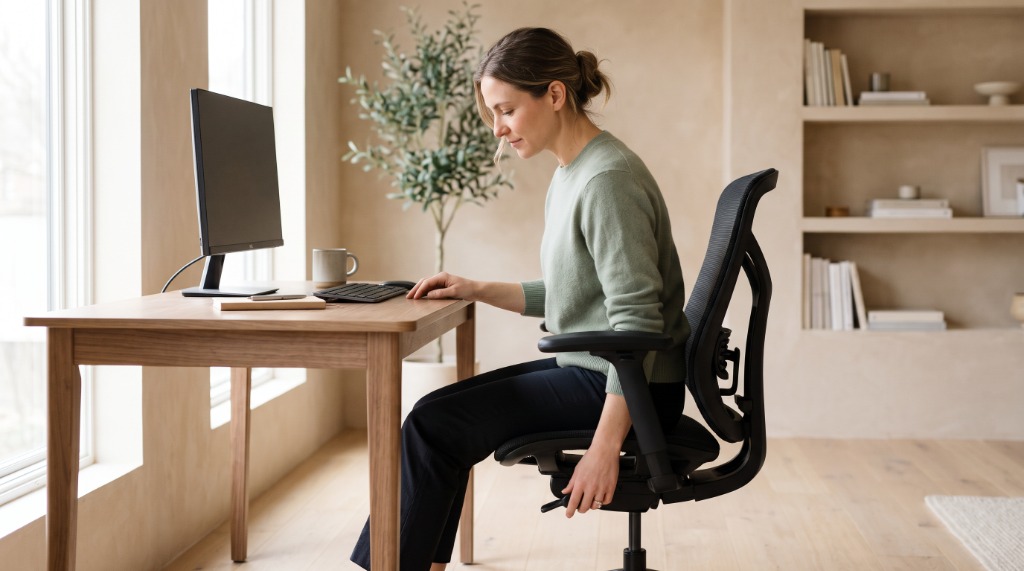
Shopping for an ergonomic office chair can quickly feel overwhelming. One model advertises dynamic lumbar support; another boasts a sliding seat pan, breathable mesh, forward tilt, and a dozen armrest adjustment levers. Prices range from under $100 to more than a high-end laptop.
Here is the clinical truth: the most expensive chair is not automatically the best chair for you.
Clinical Takeaway: A great office chair fits your specific skeletal proportions, desk height, computer setup, and daily habits. OSHA describes a properly adjusted chair as a core foundation of a safe, productive workstation—recommending support for the back, legs, buttocks, and arms, plus adjustability that enables different sitting positions throughout the day.
What Actually Makes a Chair Ergonomic?
"Ergonomic" is a popular marketing label, not a universal guarantee. In clinical biomechanics, a chair is only ergonomic in direct relation to the person using it. A chair built for someone 6'2" with long femurs will cause severe leg compression and lumbar detachment for someone 5'3". Similarly, an aggressive, non-adjustable lumbar curve that relieves one spine can cause severe facet joint irritation in another.
In practical, biomechanical terms, an ergonomic chair must allow you to:
- Maintain comfortable back support without sliding your pelvis forward into a sacral slouch
- Keep both feet planted flat on the floor (or on a firm footrest) without hanging pressure
- Avoid pressure behind your knees, preserving circulation through the popliteal fossa
- Keep your elbows comfortably close to your sides at a relaxed 90- to 100-degree angle
- Move close enough to your desk without bulky armrests blocking your keyboard reach
- Shift postures dynamically throughout the workday rather than remaining locked in a rigid angle
Start With Your Work Habits and Desk
Before comparing brands or scrolling spec sheets, audit how you actually spend your working hours:
- How many hours per day do you sit continuously?
- Do you do heads-down keyboard typing, drawing/design tablet work, or primarily client calls and video meetings?
- Do you naturally lean forward or recline when focusing?
- Do you share the chair with another family member or coworker?
- Is your desk at a fixed 29-inch height, or do you have a motorized sit-stand desk?
⚠️ The Critical Rule: Never evaluate a chair in isolation.
Even world-class lumbar support will not prevent neck and trapezius strain if your desk surface is too high, forcing your shoulders into a permanent shrug. Similarly, high-end 4D armrests will worsen your posture if they prevent you from pulling close to your keyboard, forcing you to lean forward and crane your neck.
9 Ergonomic Office Chair Features That Matter Most
1. Seat Height
Seat height is your ergonomic foundation. OSHA recommends a seat height that allows your feet to rest flat on the floor or on a footrest while keeping your thighs roughly parallel to the ground and hips level with or slightly higher than your knees. Always test seat height with your back all the way against the backrest—never perched on the front edge—and ensure your elbows rest naturally at keyboard height without shoulder elevation.
2. Seat Depth
Seat depth is the horizontal distance from the backrest to the front edge of the seat pan. If a seat is too deep, the front edge presses into the back of your knees, cutting off venous circulation and forcing you to slide your pelvis forward, completely disengaging from the lumbar support. If a seat is too shallow, your thighs lack adequate support, transferring excessive weight to your sitting bones. Look for an adjustable sliding seat pan that allows you to sit completely against the backrest with a 2- to 3-finger gap between the seat edge and the backs of your knees.
3. Lumbar Support
Lumbar support should gently cradle the natural lordotic curve of your lower spine (around L1–L5) without aggressively shoving your torso forward. Height adjustability is critical because torso lengths vary widely. If a chair's built-in lumbar support feels sharp, rigid, or hits too high in the mid-back, a smoother backrest paired with a subtle external lumbar roll is often far superior clinically.
4. Backrest Height and Recline
OSHA emphasizes that a backrest should support your spine across varied postures and allow tilt adjustment from vertical. Sitting at a continuous 90-degree angle exerts high intradiscal pressure on the lumbar spine. A synchronized recline mechanism allows you to recline slightly (100 to 110 degrees) during reading, calls, or thinking breaks, redistributing upper-body weight onto the backrest. Look for tension control that matches your body weight smoothly without requiring straining.
5. Armrests
OSHA recommends adjustable armrests that support your forearms while keeping your upper arms vertical and shoulders completely relaxed. Common armrest pitfalls include: armrests that are too high (forcing shoulder shrugs), armrests that are too wide (forcing winging elbows), or armrests that are too long (hitting the desk edge and keeping you 6 inches too far from your keyboard). If armrests block your desk, adjust them downward, slide them back, or remove them entirely.
6. Seat Cushion and Material
Softness is not the same as orthopedic support. Ultra-plush, soft cushions feel inviting for five minutes but collapse under body weight after an hour, leading to ischial tuberosity pressure points and pelvic tipping. High-density molded foam provides stable, consistent pelvic support. Quality breathable mesh promotes airflow and temperature regulation, but cheaper mesh can sag over time and create pressure on the outer thighs. Look for a rounded "waterfall" front edge—highlighted by OSHA—to prevent compression behind the thighs.
7. Chair Width and Mobility
The seat width must comfortably accommodate your hips without pinching or pressing against armrest brackets. A heavy-duty five-point star base is standard and essential for stability when shifting postures or reaching. Match your casters to your flooring: soft polyurethane casters for hardwood or tile, and firmer hard-nylon wheels for carpet.
8. Headrests
Headrests are an optional accessory, not an ergonomic requirement. They provide beneficial neck support when reclining during reading, phone calls, or video meetings. However, fixed or overly forward headrests can push your cervical spine forward into severe tech neck while typing upright. If you opt for a headrest, ensure it provides independent height and forward/backward tilt adjustment.
9. Easy-to-Use Adjustability
An adjustment mechanism only delivers value if you can reach and operate it effortlessly from a seated position. Prioritize intuitive, smooth controls for pneumatic seat height, seat depth slide, lumbar position, and tilt lock over complicated knobs that require leaving the chair to calibrate.
How to Test a Chair (In Person vs. Online)
Testing In Person
Avoid sitting for 30 seconds in a rigid "showroom posture."
- Spend 10–15 minutes sitting and adjusting levers
- Mimic your real working posture: type, lean, reach, and recline
- Check if your feet remain planted and thighs uncompressed
- Verify the lumbar support aligns with your lower back curve
Buying Online
Ignore vague marketing copy and audit the exact spec sheet:
- Minimum and maximum cylinder seat height
- Seat pan depth range and seat width
- Weight capacity and armrest adjustment range
- Return shipping policy, trial periods, and restocking fees
6 Common Chair-Buying Mistakes to Avoid
- Buying based on price alone: A $1,500 designer chair that does not match your femur length or desk height will cause just as much pain as a budget chair. Fit determines ergonomics, not price.
- Confusing plush softness with support: Notice whether your pelvis slides forward or your lumbar curve collapses after 30 minutes of sitting. Firm, contoured support prevents spinal flexion.
- Ignoring seat depth: An overly deep seat pan is one of the most common causes of numbness, leg tingling, and lumbar abandonment for shorter professionals.
- Skipping desk measurements: Measure your desk height, keyboard surface, and under-desk clearance before ordering any chair.
- Assuming armrests are always helpful: Badly positioned, non-adjustable armrests create neck and shoulder tension and block you from pulling in close to your work.
- Expecting a chair to replace movement: Even the most technologically advanced chair cannot counteract eight continuous hours of static posture. Both CDC NIOSH and OSHA emphasize short breaks and frequent posture variation throughout the day.
Quick Ergonomic Chair Buying Checklist
Before You Purchase, Confirm:
- ✓ Seat Height: Adjusts so feet rest completely flat while elbows align with keyboard height.
- ✓ Seat Depth: Leaves a 2- to 3-finger gap behind knees when back is fully against backrest.
- ✓ Lumbar Support: Aligns accurately with lower spinal curve without excessive forward pushing.
- ✓ Backrest Recline: Smooth, adjustable recline tension that supports dynamic postural variation.
- ✓ Armrests: Keep shoulders relaxed, support forearms, and slide under your desk surface.
- ✓ Seat Edge: Contoured waterfall edge that eliminates vascular thigh compression.
- ✓ Warranty & Return Policy: 30-day home trial period with clear return shipping terms.
The Practical Takeaway
The best ergonomic office chair is not the most expensive or mechanically complex—it is the one that lets you sit back, plant your feet, relax your shoulders, reach your keyboard effortlessly, and shift positions throughout the day. Pair a well-fitted chair with proper monitor height calibration and regular micro-mobility breaks for true, lasting comfort.
Dr. Chris Bowe, D.C.
Doctor of Chiropractic • Founder of DeskReliefNow
Dr. Chris Bowe, D.C. has over 15 years of clinical experience in spinal biomechanics and postural correction. Through DeskReliefNow, he provides practical educational resources and virtual workspace audits to eliminate daily pain for remote workers and corporate teams.
Educational disclaimer: This article is for general wellness education and is not an individualized medical diagnosis or surgical treatment plan. Consult a qualified healthcare professional for persistent, severe, or worsening symptoms.
Frequently Asked Questions
What is the most important feature in an ergonomic office chair?
Fit and adjustability matter most—specifically seat height, seat depth, and lumbar support. Your feet should rest flat on the floor or a footrest, your lower back should contact the backrest without pressure behind your knees, and your elbows should stay relaxed near your sides while typing.
Is a mesh or foam office chair better for long hours?
Neither is automatically better; it depends on your comfort and climate. Mesh improves airflow and reduces heat buildup during long sessions, while high-density foam provides steadier cushioning. Whichever you choose, look for a rounded waterfall front edge that distributes thigh pressure evenly after 30 to 60 minutes.
How do I know if an office chair seat is too deep?
Sit all the way back against the backrest. If the front edge of the seat presses into the backs of your knees—or if you have to slide forward off the backrest so your legs can bend—the seat is too deep. Aim for a small, comfortable gap behind your knees.
Do I really need a headrest on an ergonomic office chair?
Not necessarily. A headrest is helpful if you frequently recline during phone calls, reading, or video meetings, but it can cause neck strain if it pushes your head forward while you type upright. If you choose one, make sure it adjusts both vertically and forward-to-back.
Educational Disclaimer: This article is authored by Dr. Chris Bowe, D.C. for educational and biomechanical wellness purposes only. It is not intended as medical advice or formal surgical diagnosis. Always consult a licensed healthcare practitioner regarding persistent pain or health conditions.
Dr. Chris Bowe, D.C.
Licensed DCDoctor of Chiropractic • Founder of DeskReliefNow
Dr. Chris Bowe is a licensed Doctor of Chiropractic with over two decades of clinical experience in spinal biomechanics, neurophysiology, and posture correction for remote professionals.