
Tech neck is the everyday term for the neck, shoulder, and upper-back tension that builds after hours of looking down at phones, laptops, and tablets.
Technology itself is not automatically harmful. The real issue is how screens pull your head forward and downward while your body stays still. That posture feels harmless for a few minutes—but after hours of static focus, your neck, shoulders, and upper back begin to fatigue.
Mayo Clinic identifies leaning over a computer as a common contributor to neck pain and recommends keeping your head centered over your spine, taking regular breaks, and adjusting your monitor to a comfortable height. Tech neck is not a formal medical diagnosis; it describes a repeatable pattern of forward-head posture, limited movement, and prolonged visual focus.
Common Tech Neck Symptoms
Tech neck feels different from person to person, but common complaints include:
- Tightness at the base of the skull
- Aching across the neck and shoulders
- Stiffness when turning your head
- Upper-back fatigue or burning between the shoulder blades
- Tension-related headaches
- Discomfort after scrolling on a phone
- Trouble finding a comfortable sleeping position
Because these symptoms can also stem from injury, joint issues, nerve irritation, or stress, consult a qualified healthcare professional if they are severe, worsening, or paired with numbness or weakness.
Why Looking Down Feels So Demanding
When your head is balanced over your torso, your neck and upper-back muscles share the load efficiently. When your head drifts forward, the muscles at the back of your neck must work continuously to keep it from dropping farther, while your shoulders round and your upper back grows passive.
Short periods of looking down will not "damage" your neck—bodies are adaptable. Tech neck comes down to position + duration + repetition:
- Position: Is your screen too low or too far away?
- Duration: How long do you stay locked there?
- Repetition: How many times a day do you return to that posture?
Improving even one of those three variables can noticeably reduce daily tension.
6 Main Causes of Tech Neck
- A Low Laptop Screen: Working directly on a laptop forces you to look down for hours. For long sessions, pair a laptop stand or riser with an external keyboard and mouse—or connect a separate monitor—so your screen and hands both sit at comfortable heights.
- A Phone Held Near Your Lap: Reading below chest height drops your head forward. Raise your phone closer to eye level for longer reads, or prop it on a stand.
- A Monitor Placed Too Far Away: Small text or distance makes you lean in without noticing. Increase text size and bring the monitor closer before your neck drifts forward to compensate.
- An Off-Center Screen: Keep your primary display directly in front of you. If you split time equally between two monitors, place them close together and swivel your chair rather than twisting your neck.
- Poor Lighting and Glare: Screen reflections cause squinting and awkward head tilts. OSHA recommends arranging workstations to minimize glare from windows and overhead lights. Angle your monitor perpendicular to windows, adjust blinds, and keep the screen clean.
- An Unsupportive Chair: Sliding forward or collapsing through the upper back pulls your head away from your torso. Choose a chair that supports your back while keeping your feet planted and arms relaxed.
How to Fix Your Screen and Phone Habits
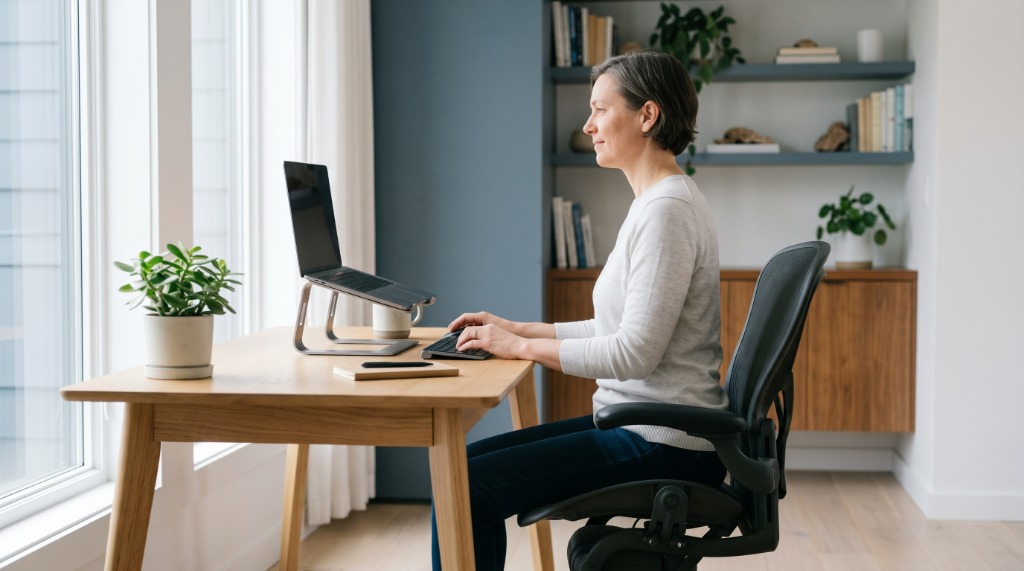
Dial in your primary screen: Center it directly in front of you at a height where you can look forward without repeatedly nodding down or tilting back (accounting for bifocals or progressive lenses). If you lean in to read, enlarge the font first.
Upgrade your phone habits:
- Hold your phone higher when reading
- Use voice-to-text for longer messages
- Take calls on earbuds or speaker instead of cradling the phone on your shoulder
- Use a stand for video calls, recipes, or extended reading
- Alternate hands when scrolling and avoid spending your entire break hunched over a phone
The 5-Minute Tech-Neck Reset
Perform these movements slowly within a comfortable range. Stop immediately if you feel sharp pain, dizziness, numbness, weakness, or escalating symptoms.
- Chin Glide: Sit or stand with relaxed shoulders. Gently draw your head straight back horizontally (like making a subtle double chin), hold for a few seconds, and relax. Keep your jaw loose and avoid nodding downward. Repeat several times.
- Neck Rotation: Slowly turn your head toward one shoulder, pause before strain, return to center, and repeat on the other side. Mayo Clinic recommends gentle movements, relaxed breathing, and avoiding bouncing—reduce range or stop if it hurts.
- Side Bend: Gently tilt one ear toward the same shoulder without shrugging, return to center, and switch sides. Never yank your head down with your hand.
- Shoulder Blade Rolls: Slowly roll your shoulders up, back, and down, then relax them forward to explore motion rather than holding a rigid squeeze.
- Upper-Back Extension: Cross your hands over your chest and gently extend your upper back over a supportive chair backrest (or stand with hands on hips to open your chest) without throwing your head back.
- Walking Reset: Walk for two to three minutes to reset your neck, shoulders, hips, and eyes all at once.
Pair the 20-20-20 Rule With Smart Reminders
Looking away from your screen regularly gives your eyes a break—just do not turn an eye break into a phone break. When you look across the room, unclench your jaw, drop your shoulders, gently turn your neck, and stand if possible.
Skip vague alarms that say "fix posture." Tie specific micro-actions to existing habits:
- Stand during your next phone call
- Walk to refill your water bottle (keep it across the room)
- Do five gentle chin glides after every meeting
- Check that your screen is centered before starting a new task
Do Posture-Correcting Devices Work?
Posture braces and wearable reminders can boost awareness, but they are not a substitute for workstation setup and movement. Straps that yank your shoulders back often feel uncomfortable if worn too tightly or too long. If you try one, treat it as a temporary cue—your long-term fix is a workable screen height, supportive seating, regular position changes, and gentle mobility work.
When Tech Neck May Be Something Else
Not every neck ache is caused by screens. Seek prompt medical evaluation for:
- Significant pain after a fall or collision
- Progressive arm or hand weakness
- Persistent numbness or tingling
- Loss of coordination
- Severe headache alongside neck symptoms
- Fever or feeling acutely unwell
- Severe, worsening, or persistent pain that disrupts daily life
The Practical Takeaway
Tech neck is rarely about one bad posture—it is about repeating the same downward position for too long. Raise your screen, reduce glare, pair your laptop with external peripherals, and take brief movement breaks before stiffness builds. You do not need to ditch your devices; you just need to make your setup more adaptable.
Frequently Asked Questions
What is tech neck and what causes it?
Tech neck is neck, shoulder, and upper-back discomfort caused by repeatedly looking down at phones, laptops, or low monitors for long periods. Holding your head forward forces the muscles at the back of your neck to work overtime, leading to fatigue, stiffness, and tension.
How can I fix tech neck while working on a laptop?
Elevate your laptop on a stand or riser so the screen sits near eye level, and connect an external keyboard and mouse so your elbows stay relaxed at your sides. Pair that setup with brief movement breaks every 30 to 60 minutes to prevent static strain.
What are the best quick exercises for tech neck relief?
Gentle chin glides, slow neck rotations, side bends, shoulder blade rolls, and a two-minute walking reset are simple ways to ease daily tension. Move slowly within a comfortable range, breathe normally, and stop if any movement causes sharp pain, dizziness, or numbness.
Do posture correctors cure tech neck?
No. Posture braces and wearable reminders can temporarily cue better awareness, but they cannot replace proper screen height, a supportive chair, and regular movement. Relying on a tight brace long-term can even feel uncomfortable without fixing the underlying workstation habits.
Educational Disclaimer: This article is authored by Dr. Chris Bowe, D.C. for educational and biomechanical wellness purposes only. It is not intended as medical advice or formal surgical diagnosis. Always consult a licensed healthcare practitioner regarding persistent pain or health conditions.
Dr. Chris Bowe, D.C.
Licensed DCDoctor of Chiropractic • Founder of DeskReliefNow
Dr. Chris Bowe is a licensed Doctor of Chiropractic with over two decades of clinical experience in spinal biomechanics, neurophysiology, and posture correction for remote professionals.